| CLN EVENT MOBILE APP GUIDE |
| |
1. Download the "Attendify - Network at Events" app from the App Store or Google Play.
2. Open the app and sign up by tapping the corresponding button at the top or bottom of the page, or log in if you already have a profile. To create an account, we recommend using the email address you registered for the event with. |
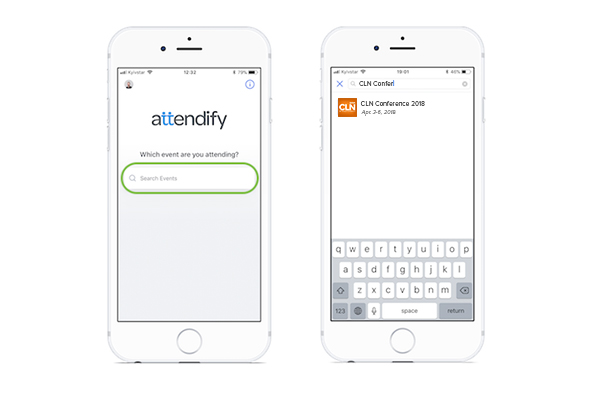 |
| 3. Search CLN Conference 2018 or simply type the keyword CLN. |
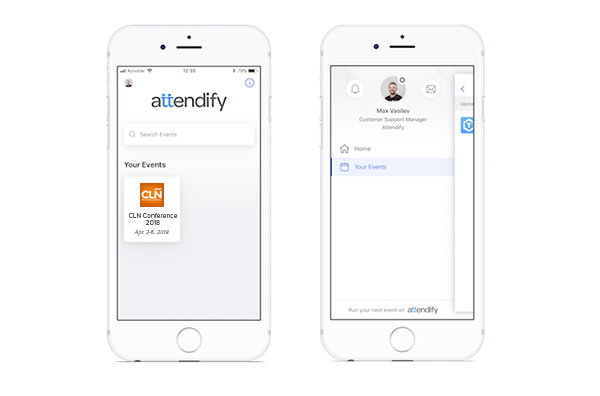 |
| 4. If you already joined the event, the CLN logo will be visible on the home screen of the Attendify App under "Your Events" section, or you can quickly open the list of all events you joined from the side menu. |
|
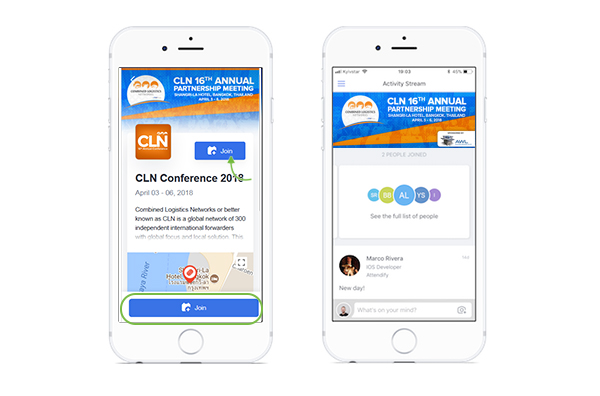
5. On the event card, you can find the event's date, location, and description. Tap join to access the CLN event, see the full, up-to-date information and start interacting with other users. |
 |
You are in now! Here is what you can do with the CLN Event Mobile App:
• Share photos, post messages, comment & like other users' posts
• @mention other attendees in your post and they will receive a notification about it
• Cross-post to other social networks (Twitter, LinkedIn)
• Connect & network with other attendees
• Send private messages
• Save participants' profiles as VCards to your phone
• Take notes (you can #tag other attendees to document something about them)
• Bookmark sessions, speakers, sponsors, exhibitors, and attendees
• Rate speakers and sessions, provide feedback & comments
• Set scheduled reminders for sessions & create a personal schedule
• Receive push notifications from the event organizer
• Vote in polls & view voting statistics
• Access all event information (schedule, documents, maps, speaker bios)
• Search attendees by "Interests" |
|